

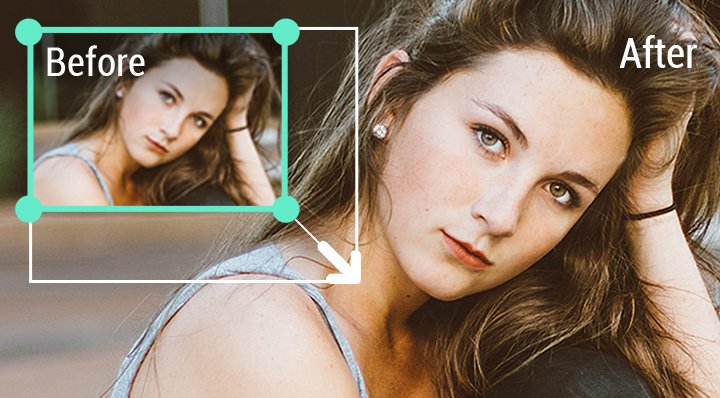
Introduction: The Growing Demand for AI Image Upscaling
In today’s fast-paced digital world, visuals drive engagement. Whether you’re a content creator, e-commerce seller, photographer, or social media influencer, image quality can make or break your online presence. But what happens when you have a beautiful photo that’s just too small or blurry to use? That’s where AI-powered image upscalers like ImgLarger.com step in.
ImgLarger is an advanced AI image enlarger and online photo enhancer that promises to enlarge, sharpen, and restore images without losing clarity or detail. Instead of traditional upscaling—which often makes photos pixelated or blurry—ImgLarger uses deep learning algorithms to intelligently predict and restore missing details. The result? High-resolution, natural-looking images that are ready for print, web, or social use.
What Is ImgLarger.com? A Simple Tool With Smart AI Brains
ImgLarger.com is an AI-powered online platform designed to upscale and enhance images automatically. You don’t need to download heavy software or learn complex editing techniques—just upload your image, choose the enhancement level, and let the AI do its magic.
Developed by the Media.io team, ImgLarger has become a go-to tool for users who want to increase image size up to 8x while maintaining quality. It’s especially popular among photographers, e-commerce sellers, and designers who need quick, professional-level results.
Core Concept Behind ImgLarger
At its heart, ImgLarger is built on convolutional neural networks (CNNs)—the same type of AI used in facial recognition and advanced visual analytics. The system analyzes each pixel, predicts missing patterns, and reconstructs sharper, higher-resolution versions of your image. This means you can take a small 500×500 image and upscale it to 4000×4000 (8x) while keeping edges smooth and textures realistic.
you may read this : The Magch Tablet Review: An Unflinching Deep Dive
Why Image Upscaling Matters in 2025
-
- The internet has evolved beyond text. From marketing to art, visuals are the language of engagement. But high-quality images require high resolution, and that’s where many users struggle—especially when dealing with older photos, screenshots, or low-resolution images from social media.
-
For Businesses and E-Commerce
Product photos play a vital role in online sales. A crisp, detailed image builds trust and drives conversions. ImgLarger allows sellers to upscale product photos for Amazon, Shopify, or Etsy listings without needing a professional studio.
-
For Content Creators
Bloggers, YouTubers, and social media influencers constantly need high-quality visuals. ImgLarger helps them transform standard images into 4K-quality visuals that look professional on any platform.
-
For Photographers and Designers
Even professionals occasionally face low-resolution issues. ImgLarger’s AI enhancement ensures that small images can be used for prints, ads, or portfolios—saving both time and effort.
How ImgLarger Works: The AI Engine Explained
Most image upscaling tools use simple pixel duplication, which enlarges the picture but sacrifices clarity. ImgLarger, on the other hand, uses a multi-layered neural network trained on millions of sample images. Here’s what happens behind the scenes:
- Image Upload: You upload a photo (JPG, PNG, or WebP).
- AI Analysis: The algorithm detects edges, colors, and textures.
- Feature Prediction: The neural network predicts missing details that would naturally appear in a higher-resolution version.
- Reconstruction: ImgLarger builds a larger image by adding new pixels intelligently rather than duplicating them.
- Enhancement: Additional AI filters improve sharpness, contrast, and color depth.
- Download: You can preview and download your enhanced image instantly.
This process takes only seconds but uses advanced machine learning techniques under the hood. It’s similar to how your eyes and brain “fill in” missing visual information when viewing low-quality images.
Main Features of ImgLarger
ImgLarger isn’t just a one-trick pony—it’s a full suite of AI photo tools that can handle multiple tasks. Let’s explore its standout features.
-
AI Image Enlarger (Up to 800%)
You can upscale images 2x, 4x, or even 8x without losing detail. Perfect for print, banners, or HD screens.
-
Image Enhancer
Removes noise, enhances sharpness, and boosts color balance to make your photos look professional.
-
Background Remover
Automatically separates subjects from the background. Ideal for product photos, profile pictures, or digital art compositions.
-
Denoiser
Cleans up grainy or low-light photos by removing digital noise while preserving texture.
-
Face Enhancer
Restores facial details in old or low-quality portraits, making it a powerful tool for photo restoration.
-
Batch Processin
- Allows multiple images to be processed simultaneously—saving time for professionals who handle large image sets.
-
Online and Mobile App Access
- ImgLarger is available both as a web platform and mobile app (Android and iOS), allowing users to enhance images anywhere, anytime.
omparing ImgLarger to Other AI Photo Enhancers
In the crowded market of AI photo enhancers, ImgLarger stands out for its simplicity and accuracy. But how does it really compare to other tools available online in 2025? Let’s take a closer look at how ImgLarger performs against some of the most popular competitors.
ImgLarger vs. Let’s Enhance
Let’s Enhance is another well-known online image upscaler. It offers similar AI-based enlargement capabilities, but its interface can feel slightly more complex to new users. ImgLarger, by contrast, focuses on accessibility — you can upload, enhance, and download within seconds. While both platforms produce excellent results, ImgLarger tends to deliver a more natural look when it comes to skin tones and facial features. It’s also more lightweight, meaning faster processing for everyday users.
ImgLarger vs. Topaz Gigapixel AI
Topaz Gigapixel AI is often praised for its studio-quality enhancement features. However, it’s a downloadable software that requires significant computing power and storage space. ImgLarger, being cloud-based, eliminates those hardware limitations. This makes it an ideal choice for users who want professional-grade results without installing large programs. While Gigapixel AI may offer slightly higher control for professionals, ImgLarger delivers 90% of that quality instantly through a web browser.
ImgLarger vs. VanceAI
VanceAI offers a variety of AI editing tools, including background removal and portrait enhancement. ImgLarger offers similar tools but organizes them in a cleaner, faster interface. Many users prefer ImgLarger’s balance between quality and ease of use. VanceAI can sometimes over-sharpen images, while ImgLarger maintains a softer, more realistic enhancement that looks natural to the human eye.
Conclusion of Comparison
When all factors are considered—speed, output quality, accessibility, and cost—ImgLarger hits the sweet spot between convenience and performance. It may not have as many customization sliders as some desktop tools, but for most creators, it provides exactly what’s needed: beautiful, crisp images in seconds.
Expert Opinions: What Professionals Say About ImgLarger
Professional reviews and user feedback have consistently placed ImgLarger among the best AI photo enhancers of 2025. Tech experts often point out its ability to retain texture and detail even when scaling images up to 8×. This is a significant improvement over traditional upscalers that rely solely on interpolation.
Digital marketing consultants love ImgLarger for its practicality. Instead of outsourcing graphic touch-ups, teams can quickly fix visuals in-house, saving both time and money. For small businesses, especially in developing countries, this cost efficiency can make a real difference. It enables local creators to produce global-quality visuals without hiring professional editors.
Photographers and digital artists have also reported positive results. Many note that ImgLarger performs exceptionally well when enlarging low-resolution portraits or artwork. Its AI face enhancement feature restores natural details without making people look artificial or over-edited—a common issue with older enhancement tools.
User Experience and Reliability
The user experience on ImgLarger.com is designed for simplicity. There are no unnecessary buttons, plugins, or pop-up ads. The website layout is responsive, clean, and mobile-friendly. This means you can upload and enhance images directly from your smartphone, laptop, or tablet.
Users appreciate the seamless process. Upload times depend on your internet connection, but once the image is on the server, the AI completes the enhancement in seconds. For most users, results are consistent and reliable. ImgLarger also deletes uploaded images automatically after processing, which helps maintain user privacy.
While rare, occasional complaints mention slower speeds during high-traffic periods. However, this is common among online AI tools that rely on cloud servers. The team behind ImgLarger continues to upgrade its infrastructure to reduce these delays.
Privacy and Security
When working with digital content online, privacy is a major concern. ImgLarger addresses this by implementing automatic file deletion after processing. In other words, your uploaded images are not stored permanently on the platform’s servers. This makes it a safe choice for those dealing with personal or sensitive content.
The website also uses HTTPS encryption to protect user data during upload and download. Although no online service can claim to be 100% risk-free, ImgLarger’s transparent policy and privacy-first approach make it one of the more trustworthy AI enhancement tools on the market.
Frequently Asked Questions About ImgLarger
- Is ImgLarger free to use?
Yes, ImgLarger offers a free version that allows you to enhance a limited number of images each month. However, the free version has restrictions on resolution and processing limits. Paid plans unlock full features, including higher upscaling ratios and batch processing. - Does ImgLarger reduce image quality?
No. ImgLarger uses deep learning algorithms designed to enhance and predict missing details. The results typically improve image sharpness, clarity, and resolution. However, the quality of the original image still plays an important role in the final output. - Is ImgLarger safe for personal photos?
Yes. Uploaded files are automatically deleted from the server after processing, ensuring user privacy. The platform also uses secure connections to protect your uploads and downloads. - How does ImgLarger compare to professional editing software?
While tools like Photoshop and Lightroom offer manual control, ImgLarger provides fast, automated enhancement powered by AI. It’s perfect for users who want professional-looking results without spending hours editing manually. - Can ImgLarger restore old photos?
Yes. The AI face enhancer and image restorer are ideal for improving old or scanned photographs. The AI detects and reconstructs facial features, colors, and contrast, bringing life back to faded images. - What devices support ImgLarger?
Since ImgLarger is browser-based, it works on any device with an internet connection—desktop, laptop, tablet, or smartphone. It also has mobile apps available for Android and iOS users who prefer offline convenience. - How long does processing take?
Most images process within a few seconds. Larger files or higher upscaling ratios may take a bit longer, but overall ImgLarger remains one of the fastest tools in its category. - Does ImgLarger leave watermarks on enhanced images?
The free version may include a watermark, but paid plans remove it completely. This is especially useful for professionals or businesses that need clean visuals for marketing or printing purposes.
Tips to Get the Best Results from ImgLarger
To maximize output quality, users can follow a few simple guidelines:
- Always start with the best available original image. The cleaner your input, the more accurate the AI predictions will be.
- Use 4× or 8× upscaling only when necessary. For web content, 2× is usually sufficient and faster.
- Experiment with the AI enhancer after upscaling to balance color and sharpness.
- For portraits, use the face enhancer separately for better skin texture and detail.
- Avoid compressing images multiple times before uploading; each compression can reduce available data for the AI to learn from.
- Test results with different lighting and contrast settings—AI models respond differently to various image tones.
By combining these simple tips with ImgLarger’s built-in intelligence, you can achieve studio-quality visuals that look professional and polished.
you may also read : improve dh58goh9
Why ImgLarger Is the Best AI Image Enlarger for 2025
As AI continues to transform digital creativity, ImgLarger represents a perfect balance between automation and artistry. It allows anyone, regardless of skill level, to enhance photos like a professional editor. The technology behind it reflects years of innovation in computer vision and machine learning, trained on massive datasets that teach the AI how to interpret real-world textures, edges, and lighting.
In 2025, when content consumption is heavily visual, ImgLarger empowers individuals and businesses to create sharper, more attractive visuals that stand out on any platform. From influencers upgrading their social content to e-commerce sellers improving product images, its benefits are universal.
Moreover, its browser-based design makes it accessible to users in all regions, including areas with limited computing resources. You don’t need expensive equipment or software licenses — just an internet connection and creativity.
Final Verdict: Is ImgLarger Worth It?
Absolutely yes. ImgLarger is a reliable, fast, and effective AI image enhancer for anyone looking to improve visual quality without spending hours editing manually. It’s beginner-friendly, cost-effective, and capable of producing professional-grade results in seconds.
Its unique ability to enlarge images up to 800% without losing detail, combined with powerful enhancement and restoration tools, makes it one of the best AI photo enhancers available in 2025. Whether you’re a casual photographer, a digital artist, or a marketing professional, ImgLarger offers immense value for its simplicity and accuracy.